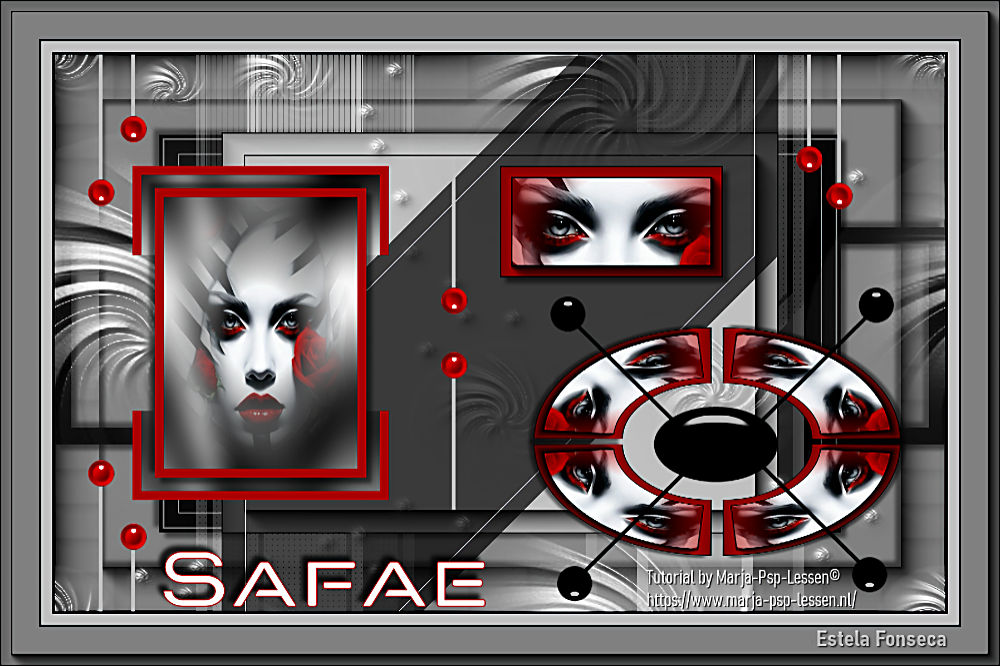
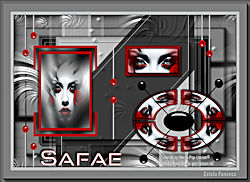
SAFAE
Tutorial de Marja , original, Aqui.
Marja criou este trabalho no PSP X2 e eu no PSP 2022 ULTIMATE.
Se você estiver usando uma versão diferente do PSP, as configurações e os efeitos dos plugins podem
produzir um resultado diferente. Nesse caso, experimente as configurações até obter o resultado desejado.
Materiais Necessários:
Tube de Marja
Mask de Marja
Outros materiais foram criados por Marja, neste caso o mpd© é adicionado.
Tubes e Marca d'água.
Este tutorial é uma criação pessoal.
Qualquer semelhança com outro é mera coincidência.
É estritamente proibido modificar os tubes, alterar seu nome ou remover as marcas registradas,
apresentá-los em seus sites ou blogs, compartilhá-los em grupos,
criar um banco de imagens ou usá-los para fins lucrativos.
Agradecemos o respeito pelo trabalho de Marja e pelos tubes.Não hesite em me avisar se tiver algum problema com esta tradução,
e tentarei corrigi-lo o mais rápido possível.
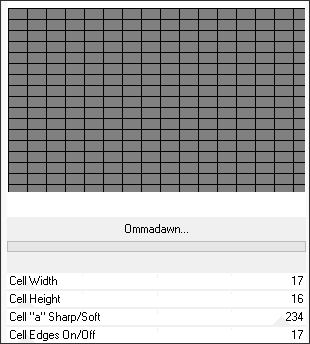
Plugins:Filter Factory Gallery V – Ommadawn*
Filters Unlimited 2.0
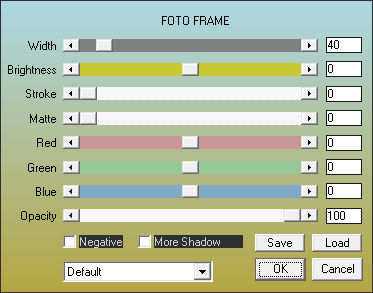
AAA Frames – Foto Frame
Toadies – What are you?
AP[Innovations] - Lines, Silverlining
Graphic Plus – Cross Shadow
*Importado para o Unlimited 2
Preparação:
Para preservar os tubes originais... Duplique os tubes e Feche os originais.
Sempre trabalhe com as cópias.
Abra as Máscaras no PSP e Minimize.
Copie as seleções (quando houver) e cole dentro da pasta de seleções do PSP.
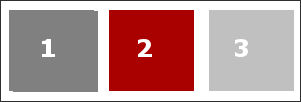
1- Abra uma nova imagem transparente de 800x500 pixels.Preencha com a cor 1
Layers / Duplicate
2- Effects / Plugins / Filters Unlimited 2.0 / Filter Factory Gallery V / Ommadawn / Default
Effects / AAA Frames / Foto Frame / Default
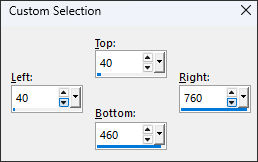
3- Selection Tool (S) Rectangle / Custom Selection: Top: 40 / Left: 40 / Bottom: 460 / Right: 760
4- Delete no Teclado.
Selections / Select None.
Effects / 3D Effects / Drop Shadow: 5 / 5 / 55 / 5 / Cor #000000
Effects / 3D Effects / Drop Shadow: -5 /-5 / 55 / 5 / Cor #000000
5- Layers / Merge / Merge Down
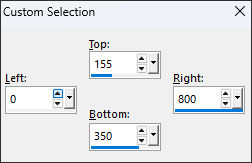
Selection Tool(S) Rectangle / Custom Selection: Top: 155 / Left: 0 / Bottom: 350 / Right: 800
6- Primeiro Plano cor #000000
Layers / New raster layer
Preencha a seleção com a cor #000000
7- Selections / Modify / Contract / 15 PixelsDelete no teclado
Selections / Select None
8- Effects / 3D effects / Drop shadow: 5 / 5 / 55 /5 / Cor #000000Effects / 3D effects / Drop shadow: -5 / -5 / 55 /5 / Cor #000000
9- Selection Tool (S) Rectangle / Custom Selection: Top: 40 / Left: 40 / Bottom: 460 / Right: 760
10- Primeiro Plano cor 1 / Plano de Fundo cor #000000
Layers / New raster layer
Preencha com a cor do Plano de Fundo.
11- Selections / Modify / Contract / 4 PixelsPreencha a seleção com a cor do Primeiro Plano
Selections / Modify / Contract 1 pixel
Preencha com a cor do Plano de Fundo.
12- Selections / Modify / Contract / 15 PixelsPreencha com a cor do Primeiro Plano
Selections / Modify / Contract / 1 Pixel
Preencha a seleção com a cor do Plano de Fundo.
Selections / Select None
13. Image / Resize / 85%... Resize All Layers ... Desmarcado.
14- Effects / 3D Effects / Drop Shadow: 5 /5/55 / 5 / Cor #000000Effects / 3D Effects / Drop Shadow: -5 /-5/55 / 5 / Cor #000000
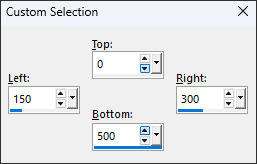
15- Primeiro Plano cor 3.Selection Tool(S) Rectangle / Custom Selection: Top: 0 / Left: 150 / Bottom: 500 / Right: 300
16- Layers / New Raster LayerPreencha a seleção com a cor do Primeiro Plano
Selections / Modify / Contract / 10 pixels
Preencha a seleção com a cor do Plano de Fundo (Preto)
17- Selections / Modify / Contract / 5 PixelsPreencha com a cor do Primeiro Plano
Selections / Select None
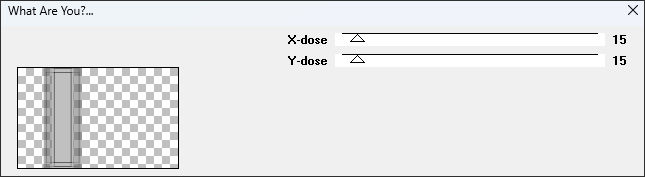
18- Effects / Plugins / Toadies / What are you? 15/15
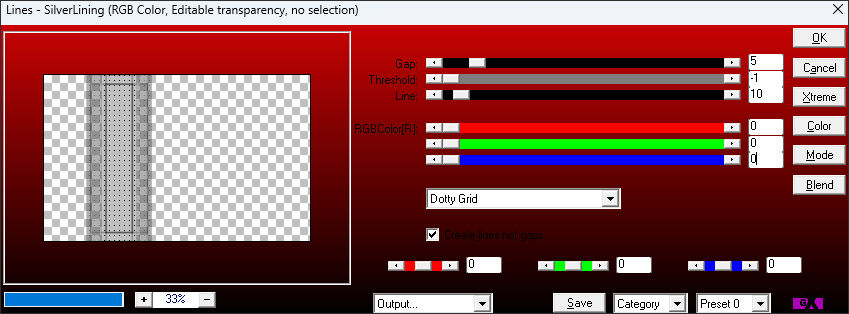
Effects / Plugins / AP[Innovations] / Lines-Silverlining
20- Effects / 3D Effects / Drop Shadow: 5 /5/55 / 5 / Cor #000000Effects / 3D Effects / Drop Shadow: -5 /-5/55 / 5 / Cor #000000
21- Layers / Duplicate
Image / Mirror / Mirror Horizontal
Layers / Merge / Merge Down
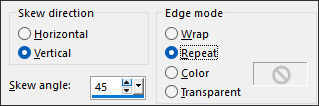
22- Effects / Geometric Effects / Skew
Blend Mode / Screen
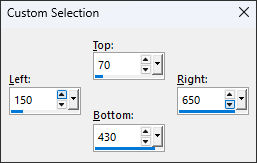
23- Selection Tool (S) Rectangle / Custom Selection: Top: 70 / Left: 150 / Bottom: 430 / Right: 650
24- Layers / New Raster LayerPreencha a seleção com a cor 3
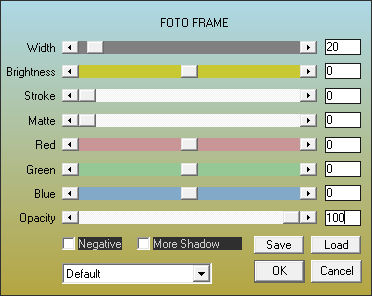
25- Effects / Plugins / AAA Frames – Foto Frame ... Mude apenas o valor de Width: 20
Selections / Select None
26- Primeiro Plano cor #ffffff
Layers / New Raster Layer
Preencha com a cor #ffffff
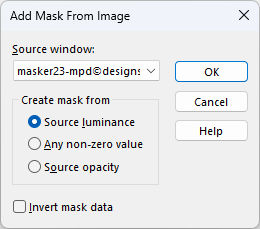
27- Layers / New Mask Layer / From Image :Masker23mpd©designs
28- Layers / Merge / Merge Group
Effects / 3D Effects / Drop Shadow: 5 /5/55 / 5 / Cor #000000
29- Selection Tool (S) Rectangle / Custom Selection: Top: 70 / Left: 150 / Bottom: 430 / Right: 650
30- Layers / New Raster Layer
Preencha a seleção com a cor preta (#000000)
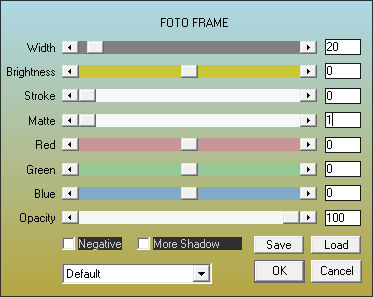
31- Effects / AAA Frames / Foto Frame ... Width:20 / Matte:1
Selections / Select None
32- Effects / Geometric Effects / Skew: Mesmas configurações de antes.Opacidade / 70
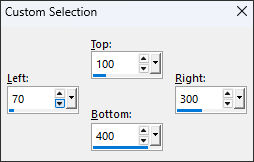
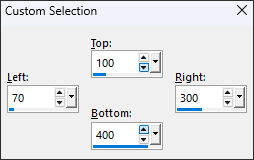
33- Selection Tool (S) Rectangle / Custom Selection: Top: 100 / Left: 70 / Bottom: 400 / Right: 300
34- Primeiro Plano cor 2 / Plano de Fundo cor 1Layers / New raster layer
Preencha a seleção com a cor do Primeiro Plano
35- Selections / Modify / Contract / 8 pixelsDelete no teclado
Layers / New raster layer
Preencha com a cor do Plano de Fundo.
36- Effects / Plugins / Graphic Plus / Cross Shadow / Default
Selections / Modify / Contract / 15 Pixels
Selections / Select None
37- Layers / Merge / Merge Down
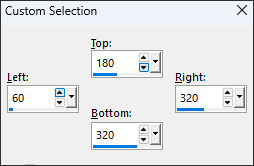
Selection Tool (S) Rectangle / Custom Selection: Top: 180 / Left: 60 / Bottom: 320 / Right: 320
38- Delete no teclado
Selections / Select None.
39- Selection (S) Rectangle / Custom Selection: Top: 100 / Left: 70 / Bottom: 400 / Right: 300
40- Selections / Modify / Contract / 20 pixels
Layers / New Raster Layer
Preencha com a cor do primeiro Plano (cor 2)
41- Selections / Modify / Contract / 8Delete no teclado
Layers / New Raster Layer
Preencha a seleção com a cor do Plano de Fundo (cor 1).
42- Effects / Plugins / Graphic Plus / Cross Shadow / Default
Layers / New Raster Layer
43- Abra o tube «misted tube Black-White-Red mpd©»
Copie e Cole na seleção
Adjust / Sharpness / Sharpen
Selections / Select None
44- Effects / 3D Effects / Drop Shadow: 5 /5/55 / 5 / Cor #000000
Layers / Merge / Merge Down
Repita isso mais uma vez.
45-Effects / 3D Effects / Drop Shadow: 5 /5/55 / 5 / Cor #000000
Effects / 3D Effects / Drop Shadow: -5 /-5/55 / 5 / Cor #000000
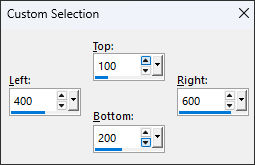
46- Layers / Merge / Merge DownSelections (S) Rectangle / Custom Selection: Top: 100 / Left: 400 / Bottom: 200 / Right: 600
47- Layers / New Raster Layer
Preencha a seleção com a cor do Primeiro Plano (cor 2)
Effects / Plugins / AAA Frames / Foto Frame ... widht: 10 / Matte:0
48- Selections / Modify / Contract / 11Ative o tube «misted tube Black-white-red mpd©» Novamente
Cope e cole como nova layer
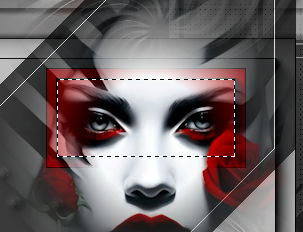
49- Image / Resize / 30%... Resize All Layers ... Desmarcado.Posicione o tube sobre a seleção ... veja:
50- Selections / Invert
Delete no teclado
Selections / Invert
51- Adjust / Sharpness / SharpenSelections / Select none
Layers / Merge / Merge down
52- Effects / 3D Effects / Drop shadow: 5 / 5 / 55 / 5,00 / Cor #000000
53- Layers / Duplicate
Effects / Distortion Effects / Polar coordinates / Rectangular to polar / Transparent
54- Layers / Duplicate
Image / Mirror / Mirror Horizontal
Effects / Image effects / Offset: H:-10 / V: 0 / Custom / Transparent ...Marcado.
55- Layers / Merge / Merge down
Layers / Duplicate
Image / Mirror / Mirror Vertical
56- Effects / Image effects / Offset: H: 0 / V: 5 / Custom / Transparent ... MarcadoLayers / Merge / Merge Down
57- Effects / Image Effects / Offset: H: 200 / V: -100 / Custom / Transparent ... Marcado
58- Ative o tube « Safae Deco 1 by mpd©» Copie e cole como nova layer
59- Effects / Image Effects / Offset: H:200 / V:-100 / Custom / Transparent... Marcado.
60- Ative o tube « Safari Deco 2 by mpd©»Copie / Cole como nova layer
61- Effects / Image Effects / Offset: H:-26 / V:0 / Custom / Transparent ... Marcado
62- Layers / Merge / Merge AllImage / Add Borders / Symmetric Marcado / 2 Pixels cor #000000
Image / Add Borders / Symmetric Marcado /10 Pixels Cor #3
Image / Add Borders / Symmetric Marcado / 2 Pixels cor #000000
63- Selections / Select AllImage / Add Borders / Symmetric Marcado /35 Pixels Cor #1
Selections / Select All
64- Effects / Plugins / AAA Frames / Foto Frame ... Width 10
65- Image / Resize / 800 pixels de Largura ... Resize all Layers ...Marcado.
66- Ative o tube « text Safae by mpd©»Copie e cole como nova layer
Coloque o texto aonde você quiser.
67- Layers / New Raster Layer
Coloque a marca d'água de Marja
Coloque a sua marca d'água ou o seu nome.
Layers / Merge / Merge All (Flatten)
Salve como JPG.
©Tutorial traduzido por Estela Fonseca em 12/07/2025.
Não alterar nem repassar sem autorização.